Presets
A preset is a ready-made set of lanes and effects to start a clip from. About a hundred come bundled, in the categories Looks, Color, Intensity, Movement, Beam, Pixels, Effects and Built-in.
Most presets set one thing, so a color preset alone leaves the lights dark until something sets their intensity. Looks come first and set intensity and color together, from a plain warm wash to a rainbow chase, so one click lights the group. Merge a movement or a beam preset over one to build on it.
Open the browser
Select a clip slot (an empty one is fine) and press ⌘P, or click Presets… in the clip editor.
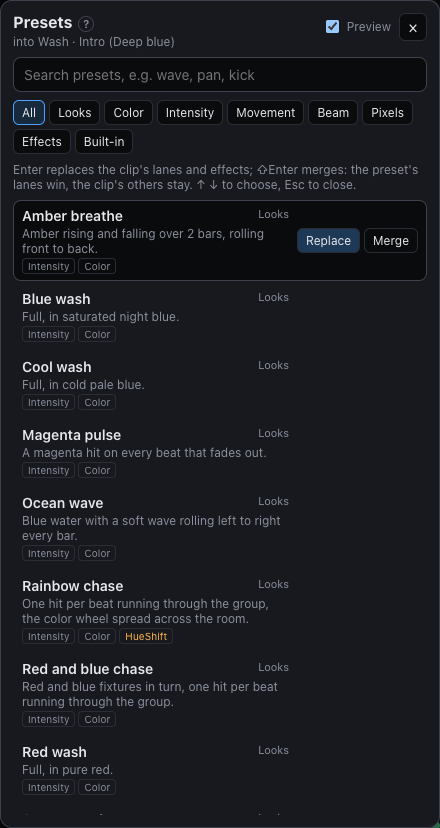
- Type to filter by name, description or the parameters a preset drives.
- Pick a category, or use ↑ ↓ to move through the list.
Try before you commit
The highlighted preset plays on the stage straight away, in its slot and with everything else as it is. It's marked Preview, and neither the lights nor the clip change. Hold ⇧ to see it merged with the clip; the Preview switch in the browser turns this off.
Use it
- Enter replaces the clip's lanes and effects with the preset's. In an empty slot it becomes a new clip.
- ⇧Enter merges it: the preset's lanes take over those parameters, the clip's other lanes stay, and its effects are added after the clip's.
Each preset sets only what it's about, so a look is quick to build by merging a color, an intensity and a movement.
Save your own
Save as preset in the clip editor keeps the clip's lanes and effects as one of yours. They appear under Mine, where × deletes one. Your presets work in any show.