Sending DMX
Each universe of 512 channels is sent over the network, as sACN (E1.31) or Art-Net. The routes are saved with the show.
Route a universe
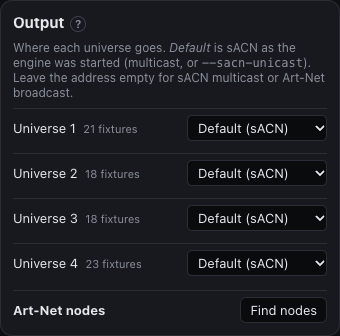
Open the Setup layout and find the Output panel, or add it to any layout. For every universe choose:
- sACN or Art-Net, or off;
- where to send it: to one node's address, or by multicast or broadcast.
By default, universes go out as sACN by multicast. The headless server's --sacn-unicast <ip> sends sACN to one address instead.
Universe numbers
Universes count from 1 in the app. Art-Net universes count from 0, so universe 1 goes to Art-Net universe 0 (0:0:0) unless you say otherwise.
Find Art-Net nodes
Find nodes polls the network for Art-Net nodes (ArtPoll) and lists their outputs. Pick a universe next to an output to send it there.
Check that it arrives
If the lights stay dark, first use Test channels (Patching fixtures) to see whether a fixture responds at all. On a Mac, check that Local Network access is allowed; see Troubleshooting.