Effects
An effect reshapes a clip without changing the clip. Move a pattern, turn it round, run it backwards, mask it to one side of the stage or shift its colors, and the same clip looks different.
Where effects go
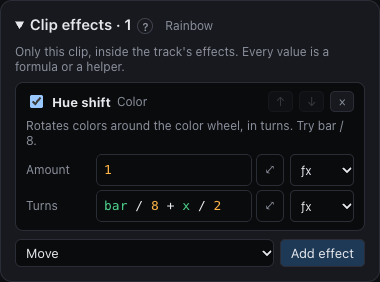
Effects sit in two places:
- On a clip: part of that look. Select the clip to see its Clip effects.
- On a track: applied to every clip on it. Click the track's name to see its Track effects.
Effects run from top to bottom, and they nest: the track's position and time effects apply before the clip's, and the clip's color effects before the track's. Both panels start folded when empty and open when they have effects.
Every effect has a dry/wet amount, and every value is a formula, so an effect can follow the beat or the music like a lane does.
The menu at the end of each value's row picks what writes it: ƒx to type a formula, or a helper (LFO, Audio, Curve or Noise) as on a lane, with the same + Modifier chain after it; see Clips and lanes. A helper's Range is typed in the value's own unit: meters for Aim, turns for Rotate and Hue shift, beats for Delay, a factor for Speed, Scale, Saturation and Brightness, and the group's width for Move and Region. Each starts from a range that suits it, such as −3 to 3 m for Aim's x. By ratio sweeps a range between two positive numbers by ratio, so a Speed from 0.5× to 2× sits at 1× half way and speeds up as much as it slows down; it's on for Speed and Scale to begin with. The formula a helper writes shows in the row, with the helper's settings below; choosing ƒx keeps that formula to edit by hand.
The effects
Position effects change the layout the clip sees:
| Effect | Does |
|---|---|
| Move | Shifts the layout. Try x = saw(bar) to scroll. |
| Scale | Stretches around the center. −1 flips; 2 repeats twice as often. |
| Rotate | Turns the layout around the center, in turns. Try bar / 4. |
| Mirror | Folds around the middle of the track's group, on X, Y or both. |
| Radial | x becomes the distance from the center, so left-to-right effects ripple outward. |
Movement effects point moving heads:
| Effect | Does |
|---|---|
| Aim | Points the heads at a target, with a spread to fan them out or cross them over. |
Time effects change when each fixture plays:
| Effect | Does |
|---|---|
| Speed | 2 is double time, 0.5 half time. Try 1 + bass. |
| Reverse | Runs the clip backwards. |
| Delay | Delays each fixture by some beats. i spreads the group over one beat. |
Mask:
| Effect | Does |
|---|---|
| Region | Only fixtures inside the area play this track. Uses positions after the effects above it. |
Color effects change what comes out:
| Effect | Does |
|---|---|
| Hue shift | Rotates colors around the wheel, in turns. Try bar / 8. |
| Saturation | 0 is white light, 1 unchanged. |
| Brightness | Multiplies intensity. Try 0.3 + 0.7 * bass. |
| Tint | Blends colors towards one color. |
| Palette | Colors the clip by its brightness: dark parts take the first color, bright parts the last. |
Mirror and moving heads
Mirror folds around the middle of the track's group, measured from its outermost pixels on the chosen axis, or both axes with X + Y. Four bars in a row meet between bars two and three; fixtures outside the group don't move that center.
Turn on Mirror movement to reflect moving-head beam directions too: the right half reflects across X, the bottom half across Y, and both together give four-way symmetry. Heads on a mirror line keep their movement on that axis. Matching heads with matching setup and programming give matching mirrored sweeps. It acts on pan and tilt lanes and leaves color-only clips alone, and continuous spins and built-in movement programs are unchanged.
Aim
Aim points the track group's moving heads at a target. The target is in meters, from the floor below the middle of the group's heads: x to the right, y towards the audience and z up from the floor. The default, y = 2, is a spot on the floor two meters in front of the heads.
Spread decides how the beams sit around the target:
- 0: every beam meets on the target.
- Between 0 and 1: they come together but don't meet.
- 1: they run parallel, each lighting its own spot.
- Above 1: they fan out.
- Below 0: they cross over before the target, so the left head lands on the right.
Every value is a formula: x = 3 * sine(beat / 16) - 1.5 swings the target from side to side, and spread = sine(beat / 4) opens and closes the beams with the music. Aim needs no pan or tilt lanes. The amount mixes from what the clip or the tracks below point at, and a track's Aim wins over a clip's.
The heads only meet where they should when Setup knows how each one hangs: its mounting, facing, home positions and height (see Layout and groups). On the Perform stage, a crosshair in the track's color marks each heard target; beams pointing down end where they meet the floor.
Coordinates
Move, Scale, Rotate, Radial and Region work in the group's own proportions, like formulas do; see Layout and groups.